Industry Manual
Dear Supporter,
We are happy to present you with the ATTD 2026 Industry Symposia Manual which will take place in Barcelona, Spain on 11-14 March 2026.
Venue Address
Entrance B and C
Plaça de Willy Brandt, 11-14, Sant Martí, 08019 Barcelona, Spain
https://ccib.es/en/
This manual covers important information and is designed to assist in preparing for your Industry Session. We trust that you will find it helpful and suggest that you read all the information presented. It will take you very little time now and could save you a great deal of time later.
Please forward this manual to everyone who is working on this project.
For further support, please don’t hesitate to contact me:
Aleksandra Sinapova
Industry Coordinator
E: asinapova@kenes.com | M: +359 895 76 0548Each supporter will receive an e-mail with login details to access the Portal. The Portal enables supporters to:
- Submit a company logo and profile
- Submit deliverables as per contract
- Order lead retrievals/scanners
The login details will be sent to the person signing the contract. This person is responsible for passing on the login details to third party if needed.
Access to all Portal services will be available only after submission of your company profile and logo.
Only deliverables as indicated in your contract, should be submitted via the Portal. Items not included in your contract will not be processed.
Lastly, Kenes Group is offering participants and supporters special rates for various hotels in Barcelona. Information, pictures, location and rates are available on the hotel accommodation page:
click here or email us at dtomov@kenes.com
Please do not hesitate to contact me for further information or assistance.
We look forward to welcoming you in Barcelona and wish you a successful Industry Session!
| Action Item (Please refer to your signed contract) |
Deadline | Contact Person |
|---|---|---|
| Staff Hotel Reservation | As soon as possible | Deyan Tomov dtomov@kenes.com or https://hotels.kenes.com/congress/ATTD26 |
| Payment of Invoice Balance | Must be received in full one week prior to the Conference |
Pazit Hochmitz |
| Symposium Final Program (for approval by Scientific Committee) |
As soon as possible and no later than Tuesday, 13th January |
Aleksandra Sinapova
|
| Program book advert | Wednesday, 04th February | |
| Promotional E-mail Blast (Exclusive and Joint) | Wednesday, 04th February | |
| Promotional Post E-mail Blast | Tuesday, 24th February | |
| Text for Push Notifications | Wednesday, 04th February | |
| Mobile app adverts | Thursday, 12th February | |
| Onsite Bag Inserts for approval of design | Thursday, 12th February | |
| K-Lead Retrieval System | Tuesday, 24th February | To reserve your Scanners, please refer to the on‐line Exhibitor’s Portal https://exhibitorportal.kenes.com/ |
| Placing orders for Voting/ ’Ask the Speaker’ and other Technology Products and Services |
As early as possible, preferably before Thursday, 12th February | Olaya Espejo |
| Hostesses & Temporary Staff Hire | Wednesday, 25th February | CCIB
Email: satellites@ccib.es |
| Catering Services for Symposium and Meeting Rooms in CCIB
|
Wednesday, 25th February
*Any changes or modifications after that deadline are subject to availability and additional fee |
CCIB
For catalogue and order form, please click here E-mail: satellites@ccib.es |
| Catering Services for Meeting Rooms in Leonardo Royal Hotel Barcelona Forum
|
Wednesday, 25th February
*Any changes or modifications after that deadline are subject to availability and additional fee |
Leonardo Royal Hotel Barcelona Forum
For catalogue, please click here Selena Solé |
| AV – scheduling Tech rehearsal, placing orders for extra AV for the Sponsored Symposia and AV for Meeting rooms ONSITE | Tuesday, 24th February | Mike Perchig |
|
Symposium Stage set up changes and Meeting room Set up changes |
Tuesday, 17th February
*No changes will be accepted after this date |
Aleksandra Sinapova asinapova@kenes.com |
| Shipping & Material Handling Services | ||
| Door to door |
Please contact Merkur |
Merkur Expo Logistics
Mrs Patricia Zintel Mobile: + 49 (0) 170 2229525 E-mail: patricia.zintel@merkur-expo.com For shipping instructions, click here |
| Airfreight shipments | ||
| Shipment via Advance warehouse | Monday, 02nd March | |
| Direct to the Venue | Please contact Merkur | |
Timetable and halls are subject to changes. The most updated timetable is published on the Conference website.
Important notes:
- Industry Symposia are not included in the main Conference CME/CPD credit.
- Please coordinate when you would like to set up the hall prior to the start of your Symposium with Aleksandra Sinapova. A member of the Kenes Operational team will be available should you need any assistance.
- Handouts can be distributed at the entrance to the Symposium Hall; however, it is NOT permitted to place material on the chairs inside the hall.
- Printed tent cards placed on the head table are allowed and should be produced and provided by Supporter.
- We ask presenters to follow the time schedule precisely in order that the day’s events may run smoothly. An updated scientific timetable can be found on the ATTD 2025 Website.
Speaker’s Expenses
ATTD 2026 will not cover Industry session(s) speaker expenses.
As indicated in the sponsorship agreement, the supporting company, in addition to the support fee, must cover all speakers’ expenses, including registration fees, accommodation and travel expenses.
This also applies in the case where the Sponsored Symposium speakers have already been invited by the Conference and have made prior travel arrangements independently.
Technical Rehearsal Onsite
We strongly recommend scheduling a technical rehearsal in the hall itself and testing the Presentations during that rehearsal. Please make arrangements directly with the Conference Audio Visual Coordinator, Mike Perchig at: nest@nest-av.com
A technical rehearsal is offered free of charge; however additional charges may apply, depending on hall availability, rehearsal requirements and overtime of the technicians.Catering
Catering is exclusive to CCIB and should be ordered advance. Supporters who wish to order food and beverages for their symposium are welcome to do so directly with CCIB:
For catalogue and order form, please click here
E-mail: satellites@ccib.es
Deadline: Wednesday, 25th February
- Food and drinks are allowed to be taken into the symposium halls. No buffet is allowed.
- Please foresee a break following the symposium of at least 30 minutes to clean the hall.
- Please note that a cleaning fee will be applied for cleaning the hall immediately following the session. The rate can be found in the catering order form.
- If you are planning to have catering together with the symposium, it is recommended to indicate in all publications that breakfast/lunch boxes will be served as long this does not contradict the supporter’s internal compliance policy.
| Hall Name | Location | Hall Capacity | Hall Layout |
| Auditorium | Level P0 | 1800 pax | Theater |
| Hall 112 | Level P1 | 600 pax | Theater |
| Hall 113 | Level P1 | 360 pax | Theater |
| Hall 114 | Level P1 | 360 pax | Theater |
| Hall 115 | Level P1 | 360 pax | Theater |
| Hall 116 | Level P1 | 360pax | Theater |
| Hall 117 | Level P1 | 700 pax | Theater |
| Hall 212 | Level P2 | 360 pax | Theater |
Click here for virtual tour of the halls.
|
Head Table in Auditorium |
|
| ➢Total Head table Dimensions: W 360 cm x H75 cm ➢ (Includes 3 table modules) Each module dimensions: W 120 cm x H 75 cm ➢For Head Table branding, please refer to the *note below |
Sufficient seating for up to 6 people 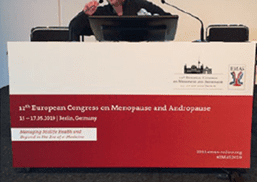 *Please inform us about the number of speakers you expect. *Please inform us about the number of speakers you expect. |
|
Head Table in Halls 112-212 |
|
| ➢Total Head table Dimensions: W 240 cm x H75 cm ➢ (Includes 2 table modules) Each module dimensions: W 120 cm x H 75 cm ➢For Head Table branding, please refer to the *note below |
Sufficient seating for up to 4 people *Please inform us about the number of speakers you expect. |
|
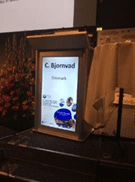
Digital Lectern in Auditorium |
|
| Ø For branding it with your own image, please contact the Audio-Visual Coordinator, Mr. Mike Perchig (e-mail: nest@nest-av.com) and coordinate it with him.
Ø The “virtual” banner can include the title of the Symposium and the name and logo of the Sponsor (if you decide to provide your own branding) |
For demonstration only.
|
|
Lectern in halls 112-212 |
|
| Front Part: 81 x 118 cm
Laterals: 50 x 118 cm |
For demonstration only.
|
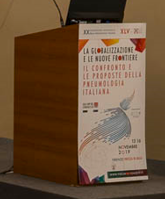
The head table and lectern will be branded with the official Conference branding. If you would like to add your own company signage , please contact the CCIB, as they hold the exclusive rights to provide branding services.
Please note that you must cover the cost for extra conference signage as removing or modifying it may cause damages. Please take into account also labor fee for removing and installing the signage.
The venue reserves the right to decline your request if there is not sufficient time between sessions to install the branding.
For head table and lectern branding ,please contact satellites@ccib.es and always copy the Industry Coordinator asinapova@kenes.com.
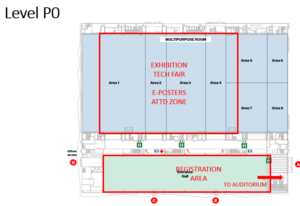
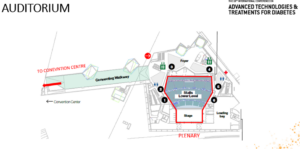
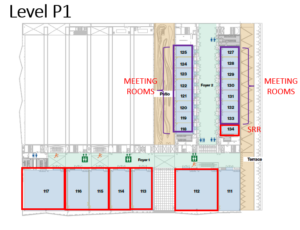
Click here for virtual tour.Halls AV Equipment:
Auditorium, ATTD 2026 Conference
- Large front projection screen in the center, image of H9 X W16 meters approx. ( see photo below )*.
- 2 x High-powered Data projectors ( Main and back-up ) to create the panoramic background image and to project the PowerPoint & Video images as picture-in-picture “windows” on the screen.
- Data/Video control system, including a seamless Data/Video switcher and all necessary cabling ( opening picture-in-picture “windows” and adding titles of the speakers on the central screen, etc.).
- Video camera, to capture the face of the speaker at the lectern for live close-circuit projection during presentations.
- 50” Confidence monitor in front of the head table, showing the same PowerPoint image as projected in the large picture-in-picture “window” on the central screen.
- Countdown Timer monitor in front of the lectern, operated by the technicians at the AV Control desk.
- Laptop computer for PowerPoint presentations, including English version of Windows and Office, USB port, sound card – located at the lectern and networked to the Speakers’ Ready Room.
- Designed lectern with a Portrai Plasma screen installed in its front, facing the audience, projecting a PPT with the name of the speaker ( see photo below )*.
- Wireless PowerPoint advancer/clicker ( we recommend using the cursor of the laptop computer as a pointer ).
- A. (sound) system, which covers the hall and the stage, including wired microphones for the head table, lectern and Questions & Answers with stands (floor/table), 1 wireless headset microphone and connection to sound from computers (mini PL plug) at the lectern.
- Audio monitors for the lectern and the head table.
- Lighting system, illuminating the lectern and the head table.
- Colorful Lighting on stage
- All the required cabling.
- 4 x AV technicians to operate the above-mentioned systems during the Sponsored Symposia.
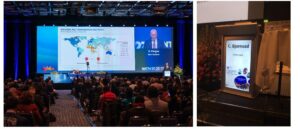
For demonstration only ( taken in other Venues )
For Sponsors’ Symposia being held in the Auditorium, the company “virtual” banners on the Panoramic screen and in front of the lectern will be projected.
Please contact the Audio-Visual Coordinator, Mr. Mike Perchig (e-mail: nest@nest-av.com), in order to design the images according to the required resolution.
The “virtual” banners can include the title of the Symposium and the name and logo of the Sponsor
Halls 112 and 117, ATTD 2026 Conference – in each :
- Front projection screen, image of H3.3 X W6 meters approx.
- Data projector, at least 14000 ansi-lumens
- 50” Confidence monitor in front of the head table, showing the same PowerPoint image as projected on the main screen.
- Countdown Timer Monitor in front of the lectern.
- Laptop computer for PowerPoint presentations, including English version of Windows and Office, USB port, sound card – located at the lectern and networked to the Speakers’ Ready Room.
- Wireless PowerPoint advancer/clicker ( we recommend using the cursor of the laptop computer as a pointer ).
- A. (sound) system, which covers the hall and the stage, including wired microphones for the head table, lectern and Questions & Answers with stands (floor/table), 1 wireless headset microphone and connection to sound from computers (mini PL plug) at the lectern.
- Audio monitors for the lectern and the head tables
- Lighting system, illuminating the lectern and the head table.
- All the required cabling.
- 2 x AV technicians to operate the above-mentioned systems during the Sponsored Symposia.
Halls 113, 114, 115, 116 and 212, ATTD 2026 Conference – in each :
- Front projection screen, image of H3 X W5 meters approx.
- Data projector, at least 12000 ansi-lumens
- 42” Confidence monitor in front of the head table, showing the same PowerPoint image as projected on the main screen.
- Countdown Timer Monitor in front of the lectern.
- Laptop computer for PowerPoint presentations, including English version of Windows and Office, USB port, sound card – located at the lectern and networked to the Speakers’ Ready Room.
- Wireless PowerPoint advancer/clicker ( we recommend using the cursor of the laptop computer as a pointer ).
- A. (sound) system, which covers the hall and the stage, including wired microphones for the head table, lectern and Questions & Answers with stands (floor/table), 1 wireless headset microphone and connection to sound from computers (mini PL plug) at the lectern.
- Audio monitors for the lectern and the head tables
- Lighting system, illuminating the lectern and the head table.
- All the required cabling.
- 2 x AV technicians to operate the above-mentioned systems during the Sponsored Symposia.
Innovation Stage/Tech. Fair, ATTD 2026 Conference
- 2 x 70” monitors on high floor stands, both showing the same PowerPoint presentations
- Laptop computer for PowerPoint presentations, including English version of Windows and Office, USB port, sound card – located at the lectern.
- Wireless PowerPoint advancer/clicker ( we recommend using the cursor of the laptop computer as a pointer ).
- A. (sound) system, which covers the area, including a wired microphone and connection to sound from computers (mini PL plug) at the lectern and 2 wireless hand-held microphones.
- AV technician to operate the above-mentioned systems during the Sponsored sessions
Presentations Upload Onsite
If you are using a PowerPoint presentation (or any other PC-based application), please note that you have to deliver it on a USB Memory stick to one of the technicians in the Speakers’ Ready Room as soon as you arrive at the Venue in the morning – and at least 1 hour before the start of the session.
Please note that conference computers in the Halls are being are supplied with Office 2019 (at least) and the native ratio of the projection on the screens in the halls is 16:9.
If you include video clips in your PowerPoint presentation, be sure to test it with the technician in the Speakers’ Ready Room at least 2 hours before the start of the session or as soon as you arrive at the venue in the morning. Please make sure to check it with the technician in the session hall where your lecture is taking place, during a coffee or lunch break prior to your session, at least 30 minutes before the start of the session – even after checking it in the Speakers’ Ready Room.
IMPORTANT NOTE FOR MACINTOSH USERS
To use MAC presentations on the PC compatible conference computer, please note that you need to prepare it according to the instructions below, before taking it to the speaker room:
- Convert it to PowerPoint or PDF.
- Use a common font, such as Arial, Times New Roman, Verdana etc. (Special characters might be changed to a default font on a PowerPoint-based PC).
- Insert the images as JPG files (and not TIF, PNG or PICT – these images will not be visible on a PowerPoint based PC).
We strongly recommend scheduling a technical rehearsal in the hall itself and testing the Presentations during that rehearsal. Please make arrangements directly with the Conference Audio Visual Coordinator, Mike Perchig at: nest@nest-av.com
A technical rehearsal is offered free of charge; however additional charges may apply, depending on hall availability, rehearsal requirements and overtime of the technicians.Due to CME/CPD accreditation criteria for this Conference, the following rules apply:
- ATTD Logo should NOT be used in any promotional materials created by the supporter.
- Materials created by companies should NOT utilize the main event marketing look and feel.
- When promoting your symposium, please always indicate on any of your promotional materials “This session is not included in the main event CME/CPD credit”
- When promoting your symposium, you are allowed to use the phrase: “Official symposium of the 19th International Conference on Advanced Technologies & Treatments for Diabetes”, which will take place in Barcelona on 11-14 March 2026.
In addition, it is not permitted to use the ATTD 2026 logo on any of the symposia materials.The final session agenda should include the following information:
- Session Title (up to 110 characters including spaces)
- Session Description (up to 200 words, you can also include hyperlinks inside of it)
- Speaker Presentations Titles
- Timing – duration of each speaker presentation and full timing of the agenda
- Speaker/Moderator Full Name
- Speaker/ Moderator Country
- Speaker/ Moderator E-mail
- Speaker/ Moderator Affiliation
- Speaker/ Moderator Bio and Photo (please see specs below)
Please see below specs for Speaker Bio and Photo.
- Speaker Bio – up to 200 words.
- Speaker Photo – 180×240 px, JPG Format
Please click here in order to provide above requested information as soon as possible and no later than Tuesday, 13th January if you need any assistance please contact the Industry Coordinator: Aleksandra Sinapova at asinapova@kenes.com.Important Note for Industry Compliance:
Direct promotion of pipeline (non-authorized) products in Spain is not allowed. (Article 1.1 in Code of Practice for the Pharmaceutical Industry, Farmaindustria, 2023). However, there are some exceptions:
- Presentation of pipeline data is permitted within the context of scientific congresses if it is purely scientific, complete, unmodified, and supervised by a scientific society.
- Disclaimers such as “Product not yet approved” or “Not authorized in Spain” are required and must be clearly visible to avoid the presentation being considered promotion.
- Satellite symposia or presentations by company-employed doctors are generally considered promotional unless rigorously shown to be unbiased and purely informative.
- Information on pipeline products can also be disseminated via scientific publications and abstracts, with no promotional modification
Guidelines to follow when creating your promotional items and content:
- When creating adverts for mobile app, program book and mailshots is allowed to promote product, symposia, or company promotion. Only when promoting symposia please add the following text inside: This session is not included in main Congress CME/CPD credit
- When creating adverts for External and Internal lobby flags in the virtual platform is allowed to promote symposia or company promotion. Only when promoting symposia please add the following text inside: This session is not included in main Congress CME/CPD credit
1.Mobile App Push Notification
For supporters entitled to a push notification as per their signed contract, kindly submit the text by Wednesday, 04th February to asinapova@kenes.com according to below guidelines:
- Message Title – Maximum 40 characters including spaces
- Message body – Maximum 140 characters including spaces
- Preferred date and local time, please with your industry coordinator
- *Note the final schedule will be determined closer to the conference, considering other push notifications.
- Push notifications will be sent out during breaks in order not to disturb the participants who are inside the halls.
2.Mobile App Advert
For Supporters sponsoring the App please send via email to and asinapova@kenes.com by Thursday, 12th February.
File format: PNG or JPG (up to 800 KB)
Size: 780 x 1688px
Kindly be advised that the advertisement is presented as a static image; therefore please ensure your design does not include any clickable URLs. Also, for optimal readability on mobile devices, we suggest avoiding small text.

3.Program Book Advert
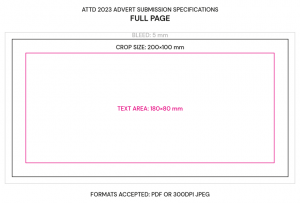
For Sponsors entitled to adverts in the printed program book as per their signed contract, please submit the file please submit the file to asinapova@kenes.com no later than Wednesday, 04th February in one of the following formats at a resolution no less than 300 dpi: EPS, Illustrator, JPG or PDF. Please refer to the diagram here under for advert dimensions for the final program.
Printing space: 200 mm x 100mm; please prepare 5mm bleed space from all sides for printing.
4. Onsite Bag Inserts
Bag inserts are to be printed and delivered by the supporter.
Should you be entitled to a bag insert as per your contract, please follow the procedure below:
- Please submit the final artwork (prior to printing) for approval no later than Thursday, 12th February via email to asinapova@kenes.com
- The bag insert should not exceed a double side of standard A4 dimensions.
- When promoting your Symposium, please include the following disclosure: This session is not included in main conference CME/CPD
- A quantity of 3500 inserts is requested.
Important Notes Regarding Shipping of Bag Inserts:
- Bag inserts must arrive at the advanced warehouse no later than Monday,02 March to be included in the Conference bags.
- Please send us who is the sender of your package, including full name and contact details.
- Merkur is the official logistic agent for the ATTD 2026 Conference. To ensure the safe and timely arrival of your inserts, we strongly recommend sending the inserts via Merkur warehouse (fees will incur). Further details can be found in the in the Shipping Instructions.
- Packages should be labeled with the supporting company name, name of the responsible person (who will be onsite), and the name and date of the event. Please also make sure to state ‘Bag Inserts on all packages.
- Supporters may deliver the Inserts directly to the venue door (NOT recommended). Kindly note that any deliveries/inserts arriving at the venue before Monday, 09 March will be refused. Direct deliveries to Suntec MUST be coordinated in advance with Merkur. Contact person: Patricia Zintel Email: Zintel@merkur-expo.com.Please share with Patricia the full delivery details such as sender name, number of boxes, tracking number, weight, dimensions. Please note that all materials entering the venue incur a handling charge (including bag inserts and display items). No other company is permitted to deliver operate, and handle goods inside the venue
- Any deliveries made directly to the venue without going through the official logistics agent will be at the supporter’s own risk. If they do not arrive on time or are misled, the conference organizers and official logistics agent will not take any responsibility.
5. Promotional Email Blast – Exclusive
Sponsors entitled to an Industry Mailshot as per their signed contract, please click here for the design requirements. Please make sure to forward these guidelines to your web-designer/programmer. Please upload the HTML version of your mailshot and other relevant files together in zip folder and send us everything with the subject line to Aleksandra Sinapova at asinapova@kenes.com no later than Wednesday, 04th February.
To ease your design process, we’ve created some ‘ready-to-use’ HTML templates that you can modify to suit your specific needs. These templates are designed to align with the design guidelines detailed in the PDF. Feel free to request these templates at any time.
6. Promotional Email Blast – Post
Sponsors entitled to an Industry Mailshot as per their signed contract, please click here for the design requirements. Please make sure to forward these guidelines to your web-designer/programmer. Please upload the HTML version of your mailshot and other relevant files together in zip folder and send us everything with the subject line to Aleksandra Sinapova at asinapova@kenes.com no later than Tuesday, 24th February.
To ease your design process, we’ve created some ‘ready-to-use’ HTML templates that you can modify to suit your specific needs. These templates are designed to align with the design guidelines detailed in the PDF. Feel free to request these templates at any time.
7. Joint E-mail Blast
For the joint e-mail blast, please prepare two files according to the following specifications:
- 1 Banner/Image Format: JPEG Width: 300 pixels Height: 250 pixels
- 1 PDF or any website (to be linked to the banner/image)
Please send the required file(s) to the Industry Coordinator: Aleksandra Sinapova at asinapova@kenes.com and no later than Wednesday, 04th February.
The exact launch date of the joint e-mail blast will be advised closer to the Conference. It will be sent out to the preregistered participants who have agreed to receive promotional material from supporters.
Important notes for both Pre and Post, Joint Mailshots:
- In case the webmail is promoting a sponsored session, please include the following disclaimer: This session is not included in main event CME/CPD credits.
- It is not allowed to use the ATTD logo.
- The event’s banner will be added to the webmail’s header by Kenes.
- The “From” field will be “ATTD 2026 Supporters”.
- The E-mail Blast will be sent out to the preregistered delegates who have agreed to receive promotional material from supporters.
- Content received after the deadline may be processed for an additional fee.
Symposium supporters have the option to create signage promoting their symposium according to the guidelines below. The symposium signage should be produced by the supporter.
1.Session Hall Signage
- Self-Standing Sign at the Entrance:
One stand-alone sign to be placed at the entrance of the session hall 30 minutes prior to the sessions published start time. Please make sure to indicate the following disclosure on the sign: This session is not included in main Conference CME/CPD credit. - Stage Banners:
1 x free standing vertical signs to be placed on/next to the stage. Maximum dimensions: 150cm wide x 250cm high. - Digital Lectern in the Auditorium
There will be a designed “digital” lectern in the Auditorium. (Please refer to Section 4: Symposia Session Halls Onsite). - Digital branding of the screen in the Auditorium – please contact the AV coordinator, Mr. Mike Perchig (e-mail: nest@nest-av.com)
The Supporter is entitled to place one sign (W85cm x H200cm) advertising the Symposium on the day of the session only. The sign may be placed in the exhibition area during exhibition opening hours. Please liaise onsite with the Kenes Staff.
Please note:
Due to CME/CPD accreditation criteria, you may not place signage advertising your symposium in any other locations unless coordinated with Kenes staff onsite.
Supporters interested in renting a meeting room during ATTD 2026 Conference should contact Industry Liaison & Sales, Mrs. Judit Gondor at: jgondor@kenes.com
Important:
Electricity and 1 multi-socket power strip in each Meeting Room. If you need any additional power strips, please contact the industry coordinator Aleksandra Sinapova at asinapova@kenes.com
All conference supporters (sponsors, exhibitors, special interest groups and other stakeholders) are kindly requested to respect the ATTD 2026 blackout policy and refrain from holding organized meetings or events for more than 10 people during the conference plenary and scientific sessions. Click here to view the scientific program.
Meeting rooms in CCIB:
For details and photos of the meeting rooms, please click here
Catering:
Supporters who wish to order food and beverages for their meeting room are welcome to do so directly with the venue:
For catalogue and order form, please click here
E-mail: satellites@ccib.es
Deadline: Wednesday, 25th February
Meeting rooms in Leonardo Royal Hotel Barcelona Forum:
Hotel address:
Located in the Poblenou District, near Parc del Fòrum.
278 Passeig del Taulat, 08019 Barcelona
View map
For details and photos of the meeting rooms, please click here
For floorplan, please click here
Catering:
Supporters who wish to order food and beverages for their meeting room are welcome to do so directly with the hotel:
For catalogue, please click here
Contact person:
Selena Solé
Email: selena.sole@leonardo-hotels.com
Deadline: Wednesday, 25th FebruaryWi-Fi
Free Wi-Fi will be available at the Conference venue. Please be aware that public Wi-Fi capacity is limited. Therefore, it is restricted to email and web browsing activity. Should you require Wi-Fi or an internet line for your meeting room, please let us know in advance and we will send you a quote.
Please approach asinapova@kenes.com
Waste Disposal
Please note that it is the supporter’s responsibility to leave the symposium session hall in a clean and tidy manner once your symposium has finished. Any items such as leaflets, banners, roll-ups must be removed from the hall at the end of your session. Any discarded waste, including promotional material, left behind will be removed by the Conference organizers at the expense of the supporter concerned.
Onsite Badges
Each supporter is entitled to 10 Symposium badges which allow access to the supporter’s symposium only (Individual names will not appear on the badges). Symposium badges can be collected 2 hours prior to the session from the Registration Desk and should be returned to the desk after the session ends.Blackout Policy
All conference supporters (sponsors, exhibitors, special interest groups and other stakeholders) are kindly requested to respect the ATTD 2026 blackout policy and refrain from holding organised meetings or events for more than 10 people during the conference plenary and scientific sessions. Click here to view the scientific program.
Lead Retrieval systems are a helpful tool for receiving participants’ contact information when they visit your booth. Information obtained by the lead retrieval system enables Exhibitors to enhance their database by securing valuable leads for further marketing and communication.
We are pleased to offer you the “K-Lead” Application. Exhibitors can download the “K-Lead” app onto their own smart phone or tablet and transform their device into an instant, easy lead retrieval system and capture participants’ full contact information with a quick scan of their badge.
Advantages of the K-Lead application:
- Seamless Integration: Download directly to your device; no extra hardware needed!
- Effortless Scanning: Quickly scan attendee badges to capture leads.
- Customizable Notes: Add personal comments to each lead for better follow-up.
- “Quick Scan” Function: Ability to quickly scan delegates as they enter the symposium hall.
- Instant Access: Get real-time lead information for immediate engagement.
- Universal Compatibility: Download from the Apple Store or Google Play using “Kenes K-Lead App.
Cost per unit: 700 EUR (excluding 4% credit card charges fees, excluding VAT if applicable).
Device is NOT included!
Deadline: Tuesday, 24th February
Onsite rate of 850 EUR will be applied for order received after above deadline.
Unlock the Power of K-Lead Plus:
- Automated Follow-up Emails: Immediately after scanning, send personalized emails to every lead. Make every connection count without lifting a finger!
- Tailored Email Customization: Craft the perfect message with customizable subject lines, email content, and signatures. Attach PDFs to add a polished, personal touch that stands out.
- Timely Engagement: Say goodbye to the hassle of manual follow-ups. K-Lead Plus handles it by sending tailored emails right after each scan, keeping your brand top of mind.
- Trackable Insights: Monitor how your emails perform with engagement metrics. Learn what works and refine your strategies for maximum impact, ensuring you’re always improving.
- Compatibility: K-Lead Plus requires at least one K-Lead license purchased.
Cost for K-Lead Plus: 350 EUR
Key Notes for K-Lead and K-Lead Plus:
- Device Not Included: The application must be installed on your personal or company device (tablet/smartphone).
- Reliable Data: Participant badge barcodes carry contact details as provided by registrants or their agencies. Note: Group registration may contain generalized information.
- Content Responsibility: Information content is managed by the registrant or their agency, not Kenes Group or the Organizing Committee.
- Easy Reservation: Secure your Wireless Barcode Reader in the Exhibitor’s Portal https://exhibitorportal.kenes.com.
- GDPR Compliance: We’ve updated our privacy policy in compliance with GDPR. Your personal data won’t be shared without consent. Presenting your badge for scanning implies consent to share your details.
- By purchasing the K-Lead and the K-Lead Plus, Exhibitors and Sponsors agree to Data Processing Agreement.
How to order K-Lead and K-Lead Plus? -> Please access the Exhibitor’s Portal https://exhibitorportal.kenes.com PLEASE NOTE: All product solutions are offered exclusively by Kenes Group.
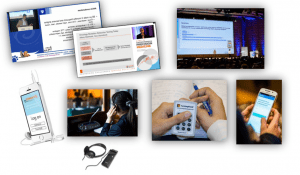
Maximize your Participant Experience – Use our innovative technologies for your Symposium
Kenes is proud to deliver a wide variety of quality onsite technology products and services.
We offer:
- Live Streaming and many more products designed for capturing and recording symposium content.
- Voting, Evaluations, and more products designed for increasing participant’s interaction during symposium sessions.
- Translation services for any language are available in two options. The conventional approach involves local interpreters and the use of headphone receivers. Alternatively, we offer a cutting-edge AI-powered solution. With this innovative method, participants can access live translations and captions seamlessly by scanning a QR code on their mobile phones.
We also provide tailor made customized solutions – contact us to make it happen!
Please contact us to discuss your needs and our relevant solutions.
Please submit your order by Thursday, 12th February. Orders received after the deadline will incur rush fees.
 Kindly note that Merkur Expo Logistics GmbH is the sole official on-site agent nominated by Kenes Group to handle all in/out shipments arriving to this Conference.
Contact details:
Deliveries and Shipments
If you need to deliver materials for your session, please coordinate with Merkur Expo Logistics GmbH, the official on-site logistics provider appointed by Kenes Group. All in/out shipments for this meeting must be handled exclusively by Merkur.
Contact details:
Merkur Expo Logistics GmbH
Patricia Zintel
E-mail: Patricia.Zintel@merkur-expo.com
Mobile: +49 (0) 170 2229525
CLICK HERE for full shipping instructions.
We strongly recommend sending your materials to Merkur warehouse in Germany.
Deadline: Monday, 02 March
It has an additional cost but by doing so you make sure that your items arrive safely and on time to the event.
Shipments sent directly to the venue will be rejected by the venue.
Supporters may choose to use their own services to deliver their symposia materials to the venue door (as of Monday, 09 March). However, no other company is permitted to deliver, operate, and handle goods inside the venue. Merkur has the responsibility of receiving and handling all materials for a fee as published on the “Tariff” section (please refer to the full shipping instructions). Handling rates are based on the incoming weight of shipments.
In order to receive a price quote for handling and to assure arrival of your materials, please be sure to complete the “Pre-advise” form included in the shipping instructions.
————————————————————————————————-
Important:
Shipping Labels must be attached to all boxes. Labels will be provided by Merkur upon request.
————————————————————————————————-
Kindly note that all shipments should be insured from point of origin.
***** We wish you a successful session ! *****
Kenes Contacts:
Conference Organiser
Kenes Group
Rue François-Versonnex 7
1207 Geneva, Switzerland
Tel: +41 22 908 0488
Fax: +41 22 906 9140
Hotel Accomodation
Deyan Tomov
E-mail: dtomov@kenes.com
Industry Coordinator
Aleksandra Sinapova
Tel: +41 22 908 0488 Ext: 217 | E-mail: asinapova@kenes.com
Audio Visual Coordinator
Mike Perchig
E-mail: nest@nest-av.com
Industry Liaison & Sales
Judit Gondor
Tel: +41 22 908 0488 Ext: 531 | E-mail: jgondor@kenes.com
Registration Specialist
Viktoria Georgieva
E-mail: reg_attd26@kenes.com
Product Marketing Coordinator
Olaya Espejo
E-mail: oespejo@kenes.com
Contractors:
Catering
CCIB
E-mail: satellites@ccib.es
Onsite Logistic Agent, Material Handing & Customs Clearance Agent
Merkur Expo Logistics GmbH
Mrs Patrici Zintel
Mobile: + 49 (0) 170 2229525
E-mail: patricia.zintel@merkur-expo.comMerkur is the exclusive handler inside the venue.
Hostesses & Temporary Staff Hire
CCIB
Email: satellites@ccib.es[printfriendly current=’yes’]